var select=document.getElementByTagName("select");
var index=select.selectedIndex;
var text=select.options[index].text;
分类: javascript/JQuery
正则匹配
空白符正则匹配
whitespace = [\x20\t\r\n\f]
\xnn 由十六进制数nn指定的拉丁字符,如,\x0A等价于\n;
\uxxxx 由十六进制数xxxx指定的Unicode字符,例如\u0009等价于\t;
所以上面:
\x20 化为二进制数为 0010 0000;
ASCII码表 http://ascii.911cha.com/
字符编码笔记 http://www.ruanyifeng.com/blog/2007/10/ascii_unicode_and_utf-8.html
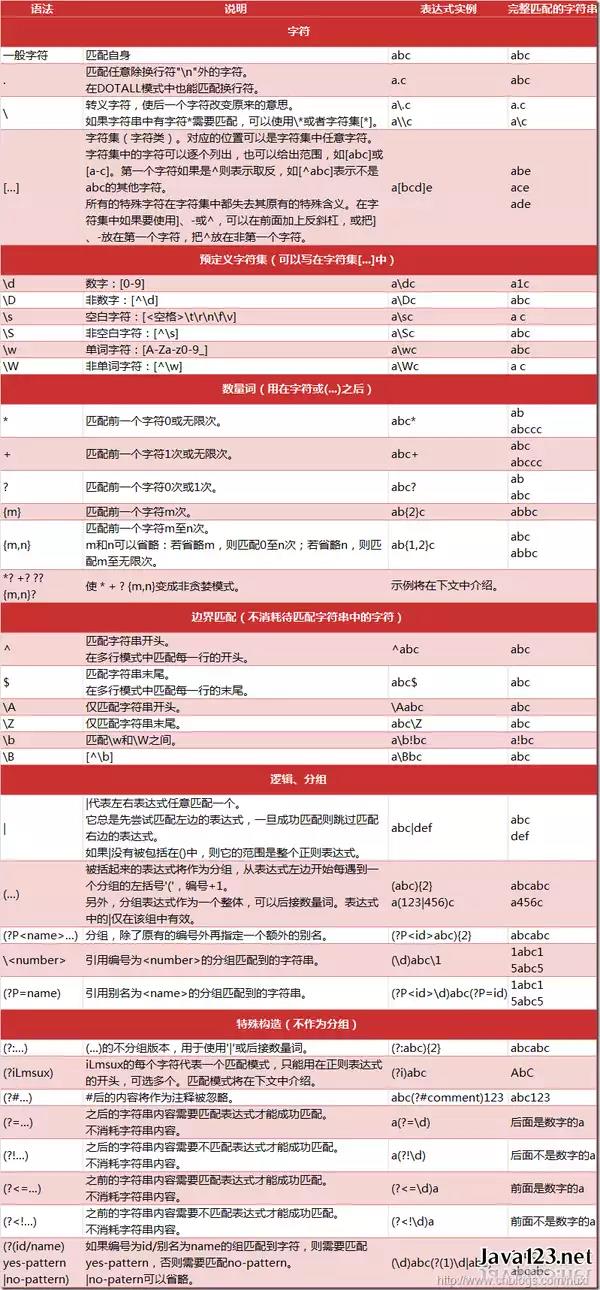
正则表:
js url get参数 转码 解码
     var target = encodeURI('中文字'); //url转码
   var afterConvert = decodeURI('%E7%BE%8E%E5%9B%A2%E7%BD%91'); //结果:"美团网"  url解密
必填选项小插件
声明
需要jq
还需要我的其他小工具
* in_array
调用
      function mustFinish_init(){

    var mustFinish_list=[
      "username",
             "password",
    ]
    MF=new mustFinish();
        //简易用法
    //MF.init("label",mustFinish_list);
        //完整用法
        MF.labels=$(".clearfix > div > label");
    MF.list=mustFinish_list;
    MF.init();

  }
    mustFinish_init();
源码
    /*===========================================必填选项*/
function mustFinish(){
  var that=this;
  this.labels=$("label");//需要标*的地方
  this.list=[];//name数组

  this.init=function(labels,list){
    that.labels=(labels)?$(labels)||that.labels:that.labels;
    that.list=list||that.list;

    //必填选项标红
    that.labels.map(function(index,element){
      var namels=$(element).parent().find("[name]");
      var isInList=false;
      namels.map(function(ind,input){
        var namevalue=input.name;
        if(in_array(namevalue,that.list)){
          isInList=true;
        }
      })
      if(isInList){
        var span=createElement("span","","*");
        span.style.color="red";
        $(element).prepend(span);
      }
    })

  }
  this.check=function(){
    var isPass=true;
    that.list.map(function(ele,ind){
      // console.dir($("[name='"+ele+"']"))
      var obj=$("[name='"+ele+"']");
      var inputValue="";
      var Nodename=obj[0].nodeName;
      var inputType;
      if(Nodename=="SELECT"){inputType="select";}
      else{inputType=obj.attr("type");}


      switch (inputType) {
        case "text":
          obj=$(obj[0]);
          inputValue=obj.val();
          break;
        case "password":
          obj=$(obj[0]);
          inputValue=obj.val();
          break;
        case "radio":
          inputValue=obj.filter(":checked").val();
          break;
        case "checkbox":
          inputValue=obj.filter(":checked").map(function(c_ind,c_ele){return c_ele.value});
          break;
        case "select":
        // console.dir(obj);
          var selecter=obj[0];
          inputValue=selecter.selectedOptions[0].value;
          inputValue=(inputValue=="请选择")?"":inputValue;
          break;
        default:
          obj=$(obj[0]);
          inputValue=obj.val();
      }
      //console.log(inputValue);
      if(!inputValue||inputValue==""){
        isPass=false;
      }
    })
    return isPass;
  }
}
window.open 打开浏览器小窗
channelmode=yes|no|1|0 是否使用剧院模式显示窗口。默认为 no。
directories=yes|no|1|0 是否添加目录按钮。默认为 yes。
fullscreen=yes|no|1|0 是否使用全屏模式显示浏览器。默认是 no。处于全屏模式的窗口必须同时处于剧院模式。
height=pixels 窗口文档显示区的高度。以像素计。
left=pixels 窗口的 x 坐标。以像素计。
location=yes|no|1|0 是否显示地址字段。默认是 yes。
menubar=yes|no|1|0 是否显示菜单栏。默认是 yes。
resizable=yes|no|1|0 窗口是否可调节尺寸。默认是 yes。
scrollbars=yes|no|1|0 是否显示滚动条。默认是 yes。
status=yes|no|1|0 是否添加状态栏。默认是 yes。
titlebar=yes|no|1|0 是否显示标题栏。默认是 yes。
toolbar=yes|no|1|0 是否显示浏览器的工具栏。默认是 yes。
top=pixels 窗口的 y 坐标。
width=pixels 窗口的文档显示区的宽度。以像素计。
window.open ("page.html", "newwindow", "height=100, width=400, toolbar=no, menubar=no, scrollbars=no, resizable=no, location=no, status=no")
回调用法
    var ref = top.window.open('url地址', '_blank', 'location=no');
var myCallback = function(event) {
    if (event.url.indexOf('sina_callback.jsp?uid') > 0) {
        alert(event.url);
        ref.close();
    }
}
ref.addEventListener('loadstart', myCallback);
js对象 计数
    var a={aa:1,bb:2};
    var a_len=Object.keys(a).length;
chrome 插件化 方便调用storage.sync函数
需要
- ajax 封装成 我喜欢的样子
- jquery
说明
c( key , value , callback )
key:
- 说明-->储存键位,可选
- 类型-->string / object
- 如果是string,支持点语法 例如 u.getConfig
- 如果是object,就会忽略value的值,直接把它写入到snyc储存
value:
- 说明-->修改的值
- 类型-->string / object / null
- 不定义value为查询,定义了value则为修改
- 如果是null , 删除该key(支持点语法)
callback:
- 说明-->修改的值,必选
- 类型-->function
- 用以输出资料
奇淫巧技
c(function(ret){console.log(ret)});//输出全部snyc储存数据c("u.getConfig",null,function(ret){console.log(ret)});//删除u下的getConfig
js
`
//c方法实现机制
function c(){
var key = arguments[0];
switch (true) {
case (typeof(key)=="undefined"):
key=null;
break;
case (typeof(key)=="function"):
key=null;
break;
case (key==""):
key=null;
break;
}
var callback,val;
//获取 回调函数 和 值
for(var i = 0 ,len=arguments.length; i < len ; i++){
if(typeof(arguments[i])=="function"){
callback=arguments[i];
}else{
if(i!=0){
val=arguments[i];
}
}
}
//如果key为json数据,直接写入并断开
if(typeof(key)=="object"&&key!=null){
//直接输入json数据,set
chrome.storage.sync.set(key, function(result){
chrome.storage.sync.get(null,function(newresult){
if(typeof(callback)!="undefined"){
callback(newresult);
}else{
return newresult;
}
})
})
return;
}
var keyObj;
var keyArr=[];
//点语法处理
keyArr=(typeof(key)!="string")?[null]:key.split(".");
chrome.storage.sync.get(keyArr[0],function(result){
switch (true) {
case (typeof(val)!="undefined"):
//存在val,判断是否要清除
if(val==null){
//清除操作
if(keyArr.length>1){
//删除对象中的一个属性
var data=childMerge(keyArr,undefined,result);
chrome.storage.sync.set(data, function(){
chrome.storage.sync.get(null,function(newresult){
if(typeof(callback)!="undefined"){
callback(newresult);
}else{
return newresult;
}
})
})
}else{
//删除整个对象
chrome.storage.sync.remove(keyArr[0], function(){
chrome.storage.sync.get(null,function(newresult){
if(typeof(callback)!="undefined"){
callback(newresult);
}else{
return newresult;
}
})
});
}
return;
}
var data=childMerge(keyArr,val,result);
chrome.storage.sync.set(data, function(){
chrome.storage.sync.get(null,function(newresult){
if(typeof(callback)!="undefined"){
callback(newresult);
}else{
return newresult;
}
})
})
break;
default:
// keyArr.splice(0,1);
ret=($.isEmptyObject(result))?"":childFind(result,keyArr);
if(typeof(callback)!="undefined"){
callback(ret)
}else{
return ret;
}
}
})
}
//遍历寻找子元素
function childFind(obj,arr){
if(arr[0]==null){
return obj;
}
if(typeof(obj[arr[0]])=="undefined"){
return undefined;
}
if(arr.length==1){
return obj[arr[0]];
}
if(arr.length>1){
var linshi=arr.concat();
linshi.splice(0,1);
return childFind(obj[arr[0]],linshi)
}else{
return obj[arr[0]];
}
}
//根据数组生成对象
function childMerge(arr,val,orobj){
var obj=clone(orobj);
var linshiObj=obj;
// arr=arr.reserve();
for(var i = 0 , len = arr.length ; i < len ; i++){
var nkey=arr[i];
switch (true) {
case (i==len-1):
linshiObj[nkey]=val;
break;
default:
if(typeof(linshiObj[nkey])!="object"&&i!=len-1){
linshiObj[nkey]={};
linshiObj=linshiObj[nkey];
}else{
linshiObj=linshiObj[nkey];
}
}
}
return obj;
}
function clone(myObj){
if(typeof(myObj) != 'object' || myObj == null) return myObj;
var newObj = new Object();
for(var i in myObj){
newObj[i] = clone(myObj[i]);
}
return newObj;
}
`
jtable bate
一些想法
1.需要保存获取数据接口和搜索接口
2.单元格区分 展示值和实际数值
如何调用
    ftable=new jtable();
    var f_post={
        "Json":{
            "alipay_name":$("#list_alipay_name :selected").text(),
            "alipay_name_id":$("#list_alipay_name :selected").attr("index_row"),
        }
    }
    ftable.post(u.file.list,f_post,function(ret){

        ftable.create({
            "ret":ret,
            "frame":{
                trans:[
                    ["t_id","ID","text"],
                ],
        }
    });


    })
css部分
/*sql_window*/
.sql_window_bg{
  position: absolute;
  width: 100%;
  height:100%;
  top:0;
  left: 0;
  z-index: 11;
}
.sql_window_con{
  position: absolute;
  width: 200px;
  height:300px;
  z-index: 12;
  background: #fff;
  border: 1px solid #ddd;
  border-width: 0 1px 4px 1px;
  padding:10px;
}

/*table补全*/
.table td{
  padding: 0 2px !important;
}
.table-bordered th,
 .table-bordered td {
   border: 1px solid #ddd !important;
 }
 .table-bordered th,
 .table-bordered td {
   border: 1px solid #ddd !important;
 }

.table-page-con{
  text-align: center !important;
  height:75px;
}
.table-page-con a{
  cursor:pointer;
}
.table-mubu{
  top:0;
  left:0;
  position: absolute;
  z-index: 99;
  width: 100%;
  height: 100%;
  background: rgba(255,255,255,.6);

}
.table td .input-group{
  max-width: 220px !important;
  min-width: 120px !important;
}
.table th {
  white-space: nowrap;
  padding:4px 3px !important;
}
插件定义部分
*/
//创建table
function jtable(){
    var that = this;
    this.url;//请求地址
    var post_data;//抛出数据
    this.trs=[];//全部tr
    this.th=[];//表头数据
    this.table=document.createElement("table");//表格
    this.css="table";
    this.table.className=this.css;
    this.sqlkey={};
    var callback;
    var ret;
    this.target=$(".maintable");//注入目标
    this.post=function(){
        this.loading();
        this.url=arguments[0];
        post_data=arguments[1];
        callback=(typeof(arguments[2])=="undefined")?callback:arguments[2];
        ajax(this.url,post_data,callback);
    }

    var frame={
        "trans":undefined,
        "hide":undefined,
        "fixed":undefined,
        "post_page_num":undefined,
        "search":undefined,
    }
    this.create=function(){
        this.loadend();
        this.target.empty();
        this.trs=[];//全部tr
        this.th=[];//表头数据
        this.table.innerHTML="";
        ret=arguments[0].ret;
        frame=(typeof(arguments[0].frame)=="undefined")?frame:arguments[0].frame;
        if(typeof(ret.data[0])=="undefined"){console.log("数据为空");return;}
        if(!(ret.data instanceof Array)){console.log("传入非数组");return;}
        //存在 页码字段
        if(!!ret.countnum&&!!ret.pagemax&&ret.pagemax>1){
            this.createpage(ret);
        }
        //不存在 sql_key 字段
        if(!post_data.Json.sql_key){
            that.sqlkey={};
        }
        for(var i =0 , len = ret.data.length; i= '"+keyvalue+"'",
                        sqlkey_field:type,
                    }
                    break;
                case "less":
                    that.sqlkey[sqlkey_field]={
                        "value":keyvalue,
                        "sqltext":sqlkey_field+" <= '"+keyvalue+"'",
                        sqlkey_field:type,
                    }
                    break;
            }
            var post_sql=[];

            // for(var sql_i in that.sqlkey){
            //  post_sql.push(that.sqlkey[sql_i].sqltext)
            // }
            post_data.Json.sql_key=that.sqlkey;
            console.table(that.sqlkey);
            console.log(post_data.Json.sql_key);

            // post_data.Json.sql_key
            that.post(that.url,post_data,callback)
            sql_w.close()
            }
        sql_w.init();


    }
}
function sql_window(){
    this.top=0;
    this.left=0;
    this.width=250;
    this.height="auto";
    this.father;
    this.result;
    this.ret;
    var that=this;
    this.init=function(){
        that.father.style.position="relative";
        var sql_bg=document.createElement("div");
        sql_bg.className="sql_window_bg";
        sql_bg.addEventListener("click",that.close);
        document.body.appendChild(sql_bg);

        var sql_w=document.createElement("div");
        sql_w.className="sql_window_con";
        sql_w.style.top=that.top +22+"px";
        var fatherLeft=that.father.offsetLeft;
        var winWidth=window.innerWidth;

        sql_w.style.left=that.left-((fatherLeft>(winWidth/2))?that.width:0)+"px";
        sql_w.style.width=this.width+"px";
        sql_w.style.height=this.height;
        this.father.appendChild(sql_w)
        //top
        var sql_w_top=document.createElement("div");
        sql_w_top.className=" sql_window_top";
        sql_w.appendChild(sql_w_top);
        //-close按钮
        var sql_close_btn=document.createElement("span");
        sql_close_btn.className="glyphicon glyphicon-remove pull-right";
        sql_close_btn.addEventListener("click",that.close);
        sql_w_top.appendChild(sql_close_btn);
        //-全选按钮
        var sql_allselect_btn = document.createElement("input");
        sql_allselect_btn.setAttribute("type","checkbox");
        sql_allselect_btn.checked=(!!this.ret&&this.ret.value!="")?false:true;
        sql_allselect_btn.addEventListener("click",that.selectAll)
        sql_w_top.appendChild(sql_allselect_btn);
        var sql_allselect_zh=document.createElement("span");
        sql_allselect_zh.innerHTML="全选";
        sql_w_top.appendChild(sql_allselect_zh);

        //选项窗口
        this.sql_w_mid=document.createElement("div");
        this.sql_w_mid.className="sql_window_mid";
        sql_w.appendChild(this.sql_w_mid)
        //-输入框
        var sql_input = document.createElement("input");
        sql_input.className="form-control keyvalue";
        sql_input.setAttribute("placeholder","搜索关键字");
        sql_input.value=(!!that.ret&&that.ret.value!="")?that.ret.value:"";
        this.sql_w_mid.appendChild(sql_input);
        //-按钮
        var sql_btn = document.createElement("button");
        sql_btn.className="btn-xs btn-primary";

        //-模糊搜索
        var mohu_btn=sql_btn.cloneNode(true);
        mohu_btn.innerHTML="模糊搜索";
        mohu_btn.addEventListener("click",function(){that.finish("like")})
        this.sql_w_mid.appendChild(mohu_btn)
        //-精确搜索
        var acc_btn=sql_btn.cloneNode(true);
        acc_btn.innerHTML="精确搜索";
        acc_btn.addEventListener("click",function(){that.finish("accuracy")})
        this.sql_w_mid.appendChild(acc_btn)
        //-大于搜索
        var more_btn=sql_btn.cloneNode(true);
        more_btn.innerHTML="大于此值";
        more_btn.addEventListener("click",function(){that.finish("more")})
        this.sql_w_mid.appendChild(more_btn)
        //-小于搜索
        var less_btn=sql_btn.cloneNode(true);
        less_btn.innerHTML="小于此值";
        less_btn.addEventListener("click",function(){that.finish("less")})
        this.sql_w_mid.appendChild(less_btn)
    }
    this.selectAll=function(){
        // console.dir(this);
        if(this.checked){
            that.finish("all");
        }

    }
    this.finish;
    this.close=function(){
        // alert(1);
        $(".sql_window_bg").remove();
        $(".sql_window_con").remove();

        // $(that.father).find("")
    }

}
function jt_child(){
    this.type="td";
    this.css;
    this.row=undefined;
    this.obj;
    this.create=function(){
        this.type=arguments[0];
        this.css=arguments[1];
        this.row=arguments[2];
        this.obj=document.createElement(this.type);
        this.obj.className=this.css;
        if(typeof(this.row)!="undefined"){
            this.obj.setAttribute("row",this.row)
        }

    }
}
//上传过滤
function post_filter(arr){
    var post_arr_type = typeof(arr);
    switch (post_arr_type) {
        case "string":
            if(arr == ""){
                return false;
            }
            break;
        case "undefined":
            console.log("输入的资料未定义")
            return false;
            break;
        case "object":
            for(var key in arr){
                var value = post_filter(arr[key]);
                if(!value){
                    return false;
                }
            }
    }
    return arr;
}
//呼叫提醒
function arm (str){
    str=(!str)?"数据为空":str;
    if(!debug){alert(str)};
    console.log(str)
}
//去除空格---函数法
//删除左右两端的空格
function trim(str){
       return str.replace(/(^\s*)|(\s*$)/g, "");
   }
//删除左边的空格
function ltrim(str){
    return str.replace(/(^\s*)/g,"");
}
//删除右边的空格
function rtrim(str){
    return str.replace(/(\s*$)/g,"");
}
js ES5 定义函数属性(property)的特性(attribute)
来源:hongdada
var foo = {};

      Object.defineProperty(foo, "x", {
          value: 10,
          writable: true, // 即{ReadOnly} = false
          enumerable: false, // 即{DontEnum} = true
          configurable: true // 即{DontDelete} = false
      });

      console.log(foo.x); // 10
      console.dir(foo.x);

      // 通过descriptor获取特性集attributes
      var desc = Object.getOwnPropertyDescriptor(foo, "x");
      console.dir(desc);
jq 插件化 自消失消息提示
js
//arm信息提示模块
function arm(str,type,addition){
  var type=(typeof(type)=="undefined")?"":type;
  var life;
  switch (type) {
    case "warning":
      life=10000;
      break;
    case "danger":
      life="long"
      break;
    case "info":
      life=10000;
      break;
    default:
      type="default";
      life=10000;
  }
  ac=new armContant();
  ac.create(str,type,life,addition)
}
var armcount=0;
function armContant(){
  this.armid=++armcount;
  var that = this;

  this.color;
  this.life;
  this.text;
  this.addition;
  this.content;
  this.closebtn=function(){
    var span =document.createElement("span");
    span.innerHTML="X";
    span.className="arm_btn_close";
    span.addEventListener("click",that.close);
    return span;
  }
  this.colorArr={
    "warning":["#F2753F","#FFFC66"],
    "danger":["#D53627","#F5F6EB"],
    "info":["#57D2F7","#666"],
    "default":["#00C4AB","#fff"],
  };
  this.create=function(){
    that.text=arguments[0];
    that.color=that.colorArr[arguments[1]];
    that.life=arguments[2]
    that.addition=arguments[3];
    //大容器
    that.content=document.createElement("div");
    that.content.className="arm_bigcon";
    that.content.style.background=that.color[0];
    that.content.style.color=that.color[1];
    that.content.setAttribute("armid",that.armid);

    // 图标容器
    var imgIcon = document.createElement("div");
    // imgIcon.className = "arm_icon_logo";
    imgIcon.className = "arm_icon_logo";
    imgIcon.innerHTML = "小冰军机处";
    that.content.appendChild(imgIcon);

    //-文字容器
    var strcon=document.createElement("div");
    strcon.className="arm_con";
    that.content.appendChild(strcon);

    //--文字
    var span=document.createElement("span");
    span.className="arm_str_main";
    span.innerHTML=that.text;
    strcon.appendChild(span)

    //--额外内容
    if(!!that.addition){
      strcon.appendChild(that.addition);
    }
    //--关闭按钮
    that.content.appendChild(that.closebtn());

    document.body.appendChild(that.content);
    if(that.life!="long"){
      setTimeout(that.close,that.life);
    }

  }
  this.close=function(){
    $("[armid="+that.armid+"]").remove();
  }
}
css
@charset "UTF-8";
/*arm*/
.arm_bigcon{
  position: fixed;
  top: 0;
  left: 0;
  width: 100%;
  z-index: 99;
}
.arm_con{
  position: relative;
  margin: auto;
  left: 0;right: 0;
  top:0;
  padding:10px;
  width: 400px;
}
.arm_btn_close{
  position: absolute;
  margin: auto;
  top:0;bottom: 0;
  right:0;
  width: 20px;height:20px;
  cursor: pointer;
}
.arm_icon_logo{
  position: absolute;
  margin: auto;
  top:0;bottom: 0;
  left:0;
  line-height: 40px;
  height:40px;
  width:100px;
  padding:0 10px;
  /*background: url(../images/miniice.png) no-repeat;*/
  /*background-color: #fcfcfc;*/
  font-family: "microsoft yahei";
  background-position: center;
  background-size: 100% auto;

}