/*
*/
pre{
white-space: pre-wrap;
word-wrap: break-word;
}
/*
*/
pre{
white-space: pre-wrap;
word-wrap: break-word;
}
css
.chart-circle-bg{
	fill:none ;
	stroke:#E4EAF5 ;
	stroke-width:10;
	stroke-miterlimit:10;
	cx:100;
	cy:100;
	r:55.056;

}
.chart-circle-line{
	fill:none;
	stroke-linecap: round;
	animation: spin 4s infinite linear;
	stroke-width:10;
	stroke-miterlimit:10;
}
js
<script>
$('input').bind('input propertychange', the_change);

function the_change(){
	var it = $(this);
	var css=($(this).attr("class"));
	var target=$(".chart-circle-line");
	var js_target=document.getElementsByClassName("chart-circle-line")[0].getBoundingClientRect();
	var h=js_target.height||Bottom - Top;
	var w=js_target.width||Right - Left;
	switch (css){
	case "ray":
		target.css("stroke-dasharray",it.val()/100*h*Math.PI+" "+it.val()/100*w*Math.PI)
		break;
	case "set":
		target.css("stroke-dashoffset",it.val()/100*h*Math.PI)
		break;
	}
}
</script>
html
<svg class="f3" xmlns="http://www.w3.org/2000/svg" xmlns:xlink="http://www.w3.org/1999/xlink" version="1.1" x="0px" y="0px" width="200px" height="200px" viewBox="0 0 200 200" enable-background="new 0 0 200 200" xml:space="preserve">
<g >
	<circle class="chart-circle-bg" />
</g>
<defs class="">
		<linearGradient id="orange_red" x1="0%" y1="0%" x2="0%" y2="100%">
		<stop offset="0%" style="stop-color:#FF675C;stop-opacity:1"/>
		<stop offset="100%" style="stop-color:#FF325C;stop-opacity:1"/>
		</linearGradient>
	</defs>
<g >
	<path class="chart-circle-line" xmlns="http://www.w3.org/2000/svg"
	stroke="url(#orange_red)"
	d="M100,44.944c30.407,0,55.056,24.649,55.056,55.056   c0,30.406-24.648,55.057-55.056,55.057c-30.406,0-55.056-24.65-55.056-55.057C44.944,69.593,69.594,44.944,100,44.944"
	/>
</g>
</svg>
<input class='ray' >
<input class='set' >
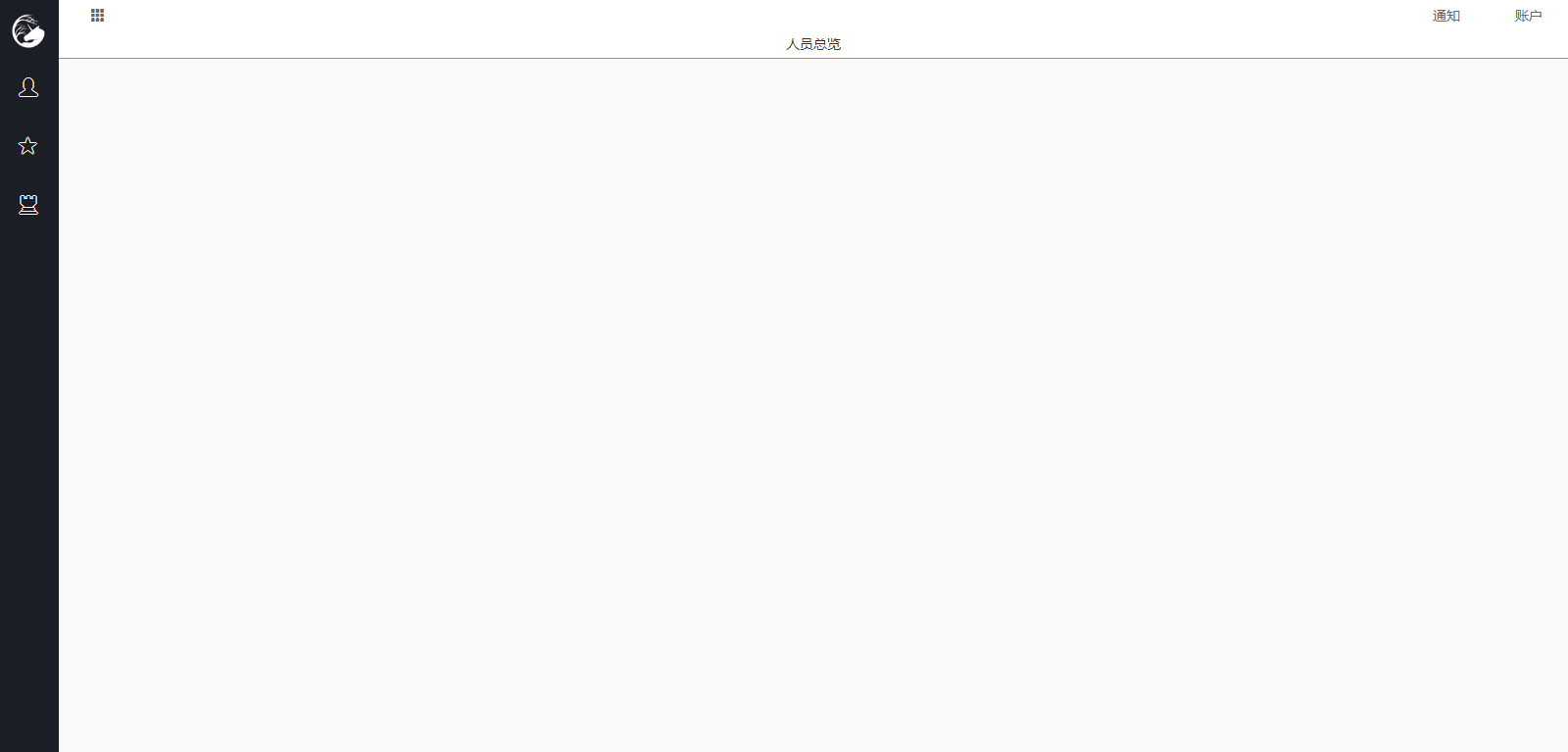
html
<html>
<head>
<meta charset="UTF-8">
<meta name="viewport" content="width=device-width, initial-scale=1.0,maximum-scale=1.0, user-scalable=no"/>
<script type="text/javascript" src="__PUBLIC__/js/jquery-2.2.4.min.js"></script>
<script type="text/javascript" src="__PUBLIC__/js/bootstrap.min.js"></script>
<script type="text/javascript" src="__PUBLIC__/js/install.js"></script>
<link rel="stylesheet" href="__PUBLIC__/css/bootstrap.min.css" />
<link rel="stylesheet" href="__PUBLIC__/css/style.css" />
</head>
<body>
<div class="page-con">
	<div class="page-left color-vh">
		<a href="#" class="logo-con">
			<img src="__PUBLIC__/images/logo.png">
		</a>
		<a href="#" class="left-con a-black">
			<span class="glyphicon glyphicon-user"></span>
			<i>人员总览</i>
		</a>
		<a href="#" class="left-con a-black">
			<span class="glyphicon glyphicon-star"></span>
			<i>角色设置</i>
		</a>
		<a href="#" class="left-con a-black">
			<span class="glyphicon glyphicon-tower"></span>
			<i>权限设置</i>
		</a>
	</div>
<script>
var url_end=(window.location.pathname).split("/")[3];
$("#"+url_end).addClass("active");
</script>
	<div class="page-right">
		<div class="page-right-top">
			<div class="p-r-t-left">
				<button class="xbtn xbtn-trans">
					<span class="glyphicon glyphicon-th"></span>
				</button>
			</div>
			<div class="p-r-t-right">
				<button class="xbtn xbtn-trans">通知</button>
				<button class="xbtn xbtn-trans">账户</button>
			</div>
		</div>
		<div class="page-right-title">
			人员总览
		</div>
		<div class="page-right-main">

		</div>
	</div>
</div>

</body>
</html>
CSS
@CHARSET "UTF-8";

/*公用*/

body{
	background:#fafafa;
	position:absolute;
	top: 0px;
	left: 0px;
	right: 0px;
	bottom: 0px;
	font-family:Trebuchet MS,"微软雅黑";
}
.auto-center{margin:auto;left:0;right:0;}
.auto-middle{margin:auto;top:0;bottom:0;}
a,a:hover,a:visited,a:focus,a:link{text-decoration:none;}
i{font-style:normal;}
/*配色*/

.xbtn{
	height:30px;
	line-height:30px;
	min-width:80px;
	padding:0 5px;
	border:1px solid transparent;
}
.xbtn-success{background:#64C5AB;color:#fff;border-color:#64C5AB;}
.xbtn-warming{background:#FF9466;color:#fff;border-color:#FF9466;}
.xbtn-danger{background:#FF6D6E;color:#fff;border-color:#FF6D6E;}
.xbtn-info{background:#00d5ec;color:#fff;border-color:#00d5ec;}
.xbtn-black{background:#1B1E25;color:#fff;border-color:#fff;}
.xbtn-black:hover{background:#fefefe;color:#1B1E25;border-color:#1B1E25;}
.xbtn-trans{background:transparent;color:#666;border-color:transparent;}

.color-vl{}
.color-l{}
.color-m{}
.color-h{background:#303543;}
.color-vh{background:#1B1E25;}

.a-black{
	background:#1B1E25;
	color:#fff;
	}
.a-black span{
	color:#1B1E25;
	text-shadow:#fff 1px 0 0,#fff 0 1px 0,#fff -1px 0 0,#fff 0 -1px 0;
}
.a-black:hover,.a-black.active{background:#303543;color:#fff;}
.a-black:hover span,.a-black.active span{color:#303543;}

/*login*/
/*login-bg*/
.login-background{
	background:#1B1E25;
	height:100%;
	width:100%;
	display:block;
	display: -webkit-flex; /* Safari */
	display: flex;
	flex-direction:column-reverse;
}
.login-background > *:not(.footer-con){
	position:absolute;
	margin:auto;
	top:0;
	bottom:0;
}
.login-bg{
	height:90%;
	width:100%;
	display:block;
	overflow:hidden;
}
@media screen and (min-width:1201px){
	.login-bg img{width:100%;}
}
@media screen and (max-width:1200px){
	.login-bg img{height:100%;}
}
/*login-main*/
.login-main{
	width:300px;
	height:420px;
	background:rgba(0,0,0,.9);
	position:absolute;
	right:20%;
}
.login-main .logo-con{
	height:80px;
	width:80px;
	position:relative;
	margin:30px auto;
	display:block;
}
.login-main .logo-con img{
	width:100%;
	height:100%;
}
.login-main form{
	display: -webkit-flex; /* Safari */
 	display: flex;
 	flex-direction:column;
 	justify-content:center;
 	align-items:center;
 }
.login-main form :not([type="submit"]):not(span){
	background:transparent;
	border:none;
	border-bottom:1px solid #999;
	width:80%;
	height:30px;
	line-height:30px;
	font-size:16px;
	color:#bbb;
	padding:0 10px

}
.login-main form span{
	margin-top:10px;
	color:#eee;
	font-weight:bold;
	font-size:18px;
}
.login-main form [type="submit"]{
	margin-top:30px;
	width:60%;
}
/*footer*/

.footer-con{
	color:#999;
	height:40px !important;
	line-height:40px;
	text-align:center;
}

/*con*/


.logo-con{
	width:100%;
	height:60px;
	line-height:60px;
	text-align:center;
}
.logo-con img{
	width:40px;
}
.page-con{
	display:-webkit-flex;
	display:flex;
	flex-flow:row nowrap;
	justify-content:space-between;
	align-items:stretch;
	height:100%;
}
.page-left{
	height:100%;
	width:60px;
	display:-webkit-flex;
	display:flex;
	flex-flow:column nowrap;
	justify-content:flex-start;
	background:
}
.left-con{
	height:60px;
	white-space:nowrap;
	box-sizing:border-box;
	line-height:60px;
	overflow:hidden;
}
.page-left:hover {
	width:200px;
}
.left-con span{
	font-size:18px;
	margin:20px;
}

.page-right{
	height:100%;
	width:auto;
	display:-webkit-flex;
	display:flex;
	flex-grow:1;
	flex-flow:column nowrap;
}
.page-right-top{
	width:100%;
	display:-webkit-flex;
	display:flex;
	justify-content:space-between;
	background:#fff;
	height:30px;
}
.page-right-title{
	border-bottom:1px double #2ABBAE;
	background:#fff;
	color:#333;
	height:30px;
	line-height:30px;
	text-align:center;
}

.page-right-main{
	display:-webkit-flex;
	display:flex;
	width:100%;
	flex-grow:1;
}
CSS
/*
text-shadow:#fff 1px 0 0,#fff 0 1px 0,#fff -1px 0 0,#fff 0 -1px 0;
*/
来源:W3school
/*
*/
div{box-sizing:border-box}
Internet Explorer、Opera 以及 Chrome 支持 box-sizing 属性。
Firefox 支持替代的 -moz-box-sizing 属性。
css
/*
*/

button{outline:inherit;}

input,textarea{-webkit-appearance:none;}
webkit-css部分
/*
*/
::-webkit-scrollbar {
		  width: 5px;
		  height:5px;
	} /* 这是针对缺省样式 (必须的) */
::-webkit-scrollbar-track {
		  background-color: #eee;
	} /* 滚动条的滑轨背景颜色 */

	::-webkit-scrollbar-thumb {
		  background-color: #666;
	} /* 滑块颜色 */

	::-webkit-scrollbar-button {
		  display:none;
	} /* 滑轨两头的监听按钮颜色 */

	::-webkit-scrollbar-corner {
		  background-color: #eee;
	} /* 横向滚动条和纵向滚动条相交处尖角的颜色 */
来源:caliban
firefox办法
/*
*/
/* AGENT_SHEET */
/* 应用于所有情况
@-moz-document url-prefix(chrome://), url-prefix(about:),
url-prefix(file:///), url-prefix(http://), url-prefix(https://){
*/
/* 滚动条背景基本样式 */
scrollbar{
-moz-appearance: none !important;
background-color: transparent !important;/* 滚动条背景透明 */
background-image: none !important; /* 滚动条背景图案不显示 */
position: relative !important; /* 更改滚动条的定位方式为相对 */
overflow: hidden !important;
z-index: 999999999 !important; /* 把滚动条提到Z轴最上层 */
}

/* 滚动条按钮基本样式 */
scrollbar thumb{
-moz-appearance: none !important;
background-color: rgba(0,100,255,.25) !important;
border-radius: 0px !important;
border: 1px !important; /* 滚动条按钮边框 */
border-color: rgba(0,100,255,.1) !important;  /* 滚动条按钮边框颜色和透明度 */
}

/* 滚动条按钮:鼠标悬停与点击拖动时基本样式 */
scrollbar:hover thumb,
scrollbar thumb:hover,
scrollbar thumb:active {
background-color: rgba(0,100,255,.75) !important;
border: 0px !important;
}

/* 垂直滚动条 */
/* 把滚动条位置移到屏幕外,这里的像素应该等于垂直滚动条宽度的负值 */
scrollbar[orient="vertical"]{ margin-left: -5px !important;
min-width: 5px !important; max-width: 5px !important;
}

/* 垂直滚动条按钮的左边框样式 */
scrollbar thumb[orient="vertical"]{
border-style: none none none solid !important;
}

/* 水平滚动条 */
/* 把滚动条位置移到屏幕外,这里的像素应该等于垂直滚动条宽度的负值 */
scrollbar[orient="horizontal"]{ margin-top: -5px !important;
min-height: 5px !important; max-height: 5px !important;
}

/* 水平滚动条按钮的上边框样式 */
scrollbar thumb[orient="horizontal"]{
border-style: solid none none none !important;
}

/* 去除垂直与水平滚动条相交汇的角落 */
scrollbar scrollcorner{display: none ! important; }

/* 滚动条两端按钮不显示 */
scrollbar scrollbarbutton { display: none ! important; }
/* 滚动条两端按钮,需要先删掉上面一行
scrollbarbutton{ -moz-appearance: none !important;
position: relative !important;
overflow: hidden !important;
background-color: rgba(0,100,255,.25) !important;
border: none !important;
}
scrollbar:hover scrollbarbutton, scrollbar scrollbarbutton:hover{
background-color: rgba(0,100,255,.75) !important;
}
/* 竖滚动条两端按钮的高度
scrollbar[orient="vertical"] scrollbarbutton {
max-height:10px !important; min-height:10px !important;
}
/* 横滚动条两端按钮的宽度
scrollbar[orient="horizontal"] scrollbarbutton {
max-width: 10px !important; min-width: 10px !important;
}

  */

/*
} */
来源:http://www.w3cways.com/1670.html
IE浏览器css设置滚动条
| 滚动条样式 | 支持情况 | 支持浏览器版本 | 可否继承 | 描述 |
|---|---|---|---|---|
| scrollbar-3dlight-color | IE特有属性 | IE5.5+ | y | 设置滚动框的和滚动条箭头左上边缘的颜色 |
| scrollbar-highlight-color | IE特有属性 | IE5.5+ | y | 设置滚动框的和滚动条箭头左上边缘的颜色 |
| scrollbar-face-color | IE特有属性 | IE5.5+ | y | 设置滚动框和滚动条箭头的颜色 |
| scrollbar-arrow-color | IE特有属性 | IE5.5+ | y | 设置滚动条箭头的颜色 |
| scrollbar-shadow-color | IE特有属性 | IE5.5+ | y | 设置滚动框的和滚动条箭头右下边缘的颜色 |
| scrollbar-dark-shadow-color | IE特有属性 | IE5.5+ | y | 设置滚动条槽的颜色 |
| scrollbar-base-color | IE特有属性 | IE5.5+ | y | 设置滚动条主要构成部分的颜色 |
| scrollbar-track-color | IE特有属性 | IE5.5+ | y | 设置滚动条轨迹组成部分的颜色 |
/*
*/
select{
        appearance:none;
	-moz-appearance:none;
	-webkit-appearance:none;
	line-height:100%;
}
/*
*/

position:absolute;left:50%;-webkit-transform:translate(-50%,0);transform:translate(-50%,0);
源自原文:张鑫旭——鑫空间
要实现gif动画的暂停播放效果有很多方法,这里只写出我比较喜欢的一种。
animation模拟gif动画。
原理就是逐帧移动背景,以达到gif的播放效果
gun.jpg如下:

CSS代码部分:
/*
css部分*/
.ball{display:block;
        width:40px;
        height:40px;
	border-radius:80px;
	background:url(../images/gun.jpg) center no-repeat ;
        background-size:auto 100%;
        animation: heart-burst steps(4) 0.4s infinite both;
}
@keyframes heart-burst {
  0% {
    background-position: 0%;
  }
  100% {
    background-position: 100%;
  }
}
HTML代码部分:
/*
HTML代码部分*/
<div class="ball " id="ball" style="animation-play-state: paused;"></div>
<button type="button">点我开始</button>
js代码部分:
/*
js代码部分*/
$("button").click(function(){
    $(".ball").attr("style","");
})